![Adepth Command Center for a Bitrix24 workspace: spend from Google Ads and Meta next to deals closed in the CRM]
This is the end state: one screen where the money spent in Google Ads sits next to the deals that closed in Bitrix24, campaign by campaign. The screen above is Adepth's demo cabinet for the last 90 days (read on 5 November 2026): $28,241 of ad spend, 104 closed deals, 75 of them linked to a campaign by an exact ID. Below is how to get a Bitrix24 portal to that screen, what has to exist on your leads before it works, and how to read the table once it does.
What "integration" usually means, and why it is not this
Search for "Bitrix24 Google Ads integration" and you get connectors that push conversions to Google: a deal reaches a stage, a webhook sends an offline conversion with the click ID, and Google's bidding learns from it. Useful, but it answers Google's question ("which clicks should I buy more of?"), not yours ("which campaign made money?"). For that you need the opposite direction: read closed deals out of Bitrix24, link each one to the campaign that produced it, and put the revenue next to the spend.
Before you start
- A Bitrix24 portal with deals that carry a sum. Adepth reads the deal's amount (
OPPORTUNITY), its close date and its stage. A pipeline where won deals have no amount produces revenue of zero, honestly. - UTM fields filled on leads or deals. Bitrix24 has the standard
UTM_SOURCE,UTM_MEDIUM,UTM_CAMPAIGN,UTM_CONTENTandUTM_TERMfields on both leads and deals; the sync reads all five. Check a recent lead from an ad: if those fields are empty, your site forms are not passing the URL parameters into the CRM, and nothing downstream can fix that. - The ad platform's own IDs in those tags. This is the one that decides whether a deal gets linked exactly or not at all. In Google Ads, put
{campaignid}(and, if you like,{adgroupid}or{creative}) intoutm_termorutm_contentthrough the tracking template. In Meta, the{{campaign.id}},{{adset.id}}and{{ad.id}}macros do the same. A human-readableutm_campaignsuch asspring_saleis kept as a label, but it links nothing: the product never guesses a campaign from a name. - Admin rights in the Bitrix24 portal to install a marketplace app, and access to the Google Ads account you want to read.
Step 1: Install Adepth from the Bitrix24 Marketplace
Open the Marketplace inside your portal, find Adepth, install. The app asks for read access to the CRM through OAuth; it never writes to your portal. The first sync imports deals, leads, pipeline stages and the list of sales reps. On the trial and the Pro plan the CRM is re-read every three hours, on Premium every thirty minutes.
What you should see: the Bitrix24 badge in the "Data from" row at the top of the Command Center, and a deal count that matches your pipeline.
Step 2: Connect Google Ads
In Adepth go to Settings → Integrations, click Connect next to Google Ads, sign in with the Google account that has access to the ad account and grant read-only access. Adepth lists the ad accounts it can see; pick the ones that advertise for this business. Spend, clicks and the campaign list start syncing on the same schedule as the CRM.
What you should see: the Google Ads badge next to Bitrix24 in the "Data from" row, and a spend figure in the first KPI tile that matches the ad account for the chosen period.
Step 3: Map the pipeline stages
Every portal names its stages differently. Settings → Integrations → Stage Mapping shows your Bitrix24 stages on one side and Adepth's funnel on the other: New Lead, Qualified, Proposal, Negotiation, Closed Won, Closed Lost. Tick which of your stages is "won". This is the only place that decides what counts as revenue, so do it before reading any number.
What you should see: the "Deals closed" tile stops showing zero and the stage names in the Deal Velocity block are yours.
Step 4: Check the exact links

After the first sync the "Deals closed" tile says how many of the won deals could be linked to a campaign. In the demo it is 75 of 104. The linking rule is strict on purpose: a deal is attached to a campaign only when one of its UTM fields contains that campaign's ID, or the ID of an ad set or ad that belongs to it. A deal whose tags hold no ID stays unlinked and is reported as such; it is never spread across campaigns by a model.
If the number is far below your expectation, the cause is almost always step "before you start": the IDs are not in the tags. The footnote under the campaign table says so in words, per platform.
Step 5: Map the sources that carry no tags
Phone calls, chats and walk-ins arrive in Bitrix24 with a source but no UTM. The Sources tab of the CRM settings (Settings → Integrations → Bitrix24) lists every CRM source with the campaigns it may come from; tick the campaigns a source's records belong to. The counting stays exact, with no estimate: on a day when only one of the ticked campaigns was running, that day's records go to it; on days when several were, they count for the set as a whole; records that arrived while none was running stay unlinked. Records that already carry an ad ID keep the campaign the ID names, whatever the source mapping says.
What you should see: the unlinked share in the KPI tile goes down, and nothing in the campaign table moves except the campaigns you ticked.
Step 6: Read the campaign table
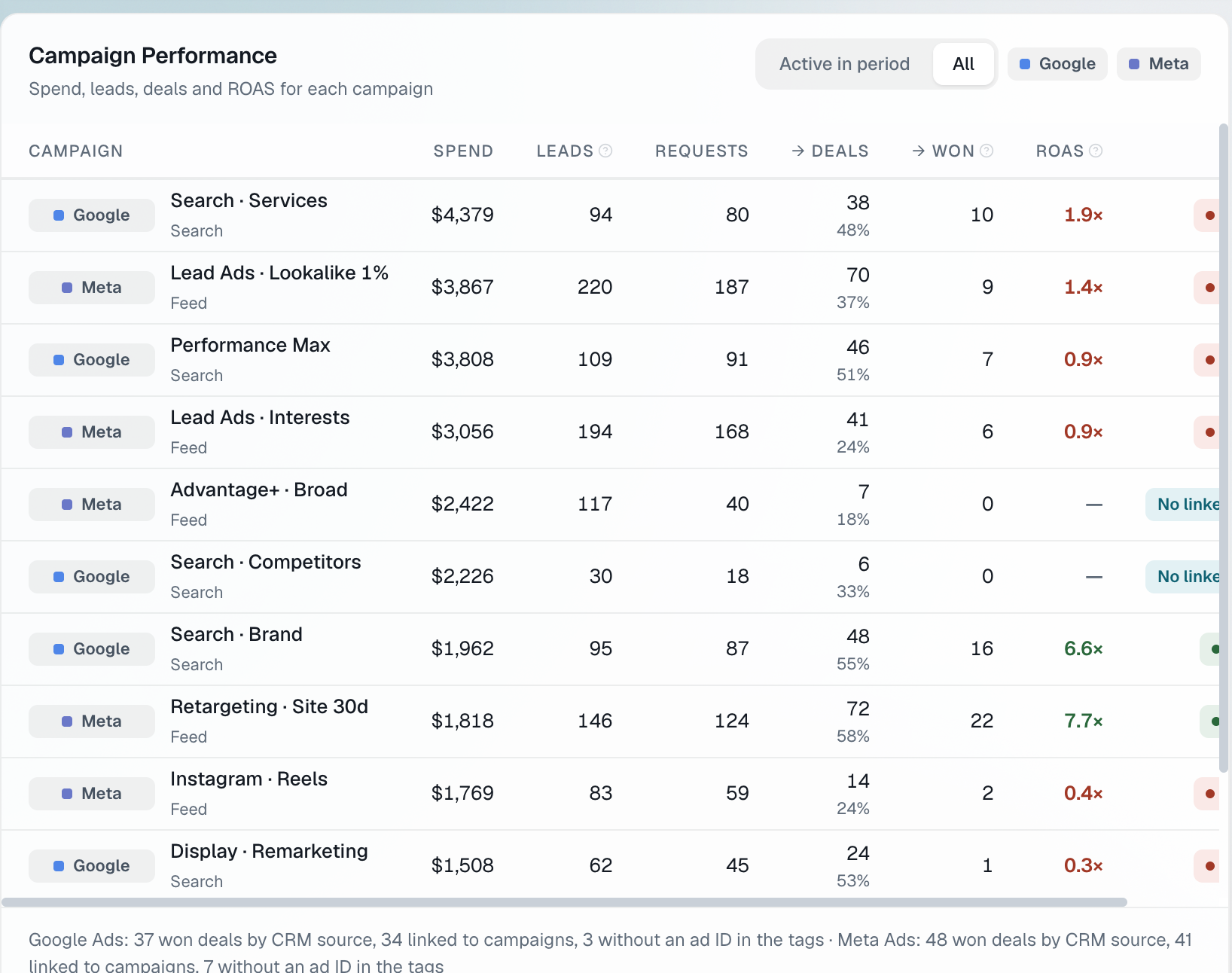
Each row is one campaign, left to right: what it cost, how many leads the platform counted, how many requests actually reached the CRM, how many became deals, how many of those were won, and the ROAS on the revenue of those won deals. Two things in this table are different from an ad platform's report.
Won deals are counted by close date, the same as the revenue and the ROAS. A campaign evaluated in the month it ran will look worse than it is if your sales cycle is long; give it the period in which its deals close.
Campaigns with spend and no linked won deal show "No linked" instead of a number. In the demo that is Advantage+ · Broad and Search · Competitors: $2,422 and $2,226 of spend, leads and deals opened, zero won deals linked. The ROAS column does not print 0× for them, because 0× would claim knowledge the data does not have.
In the demo period the picture is clear: Search · Brand (6.6×) and Retargeting · Site 30d (7.7×) are the two campaigns above the 4× target; Search · Services, the biggest spender at $4,379, returns 1.9×; Performance Max, Lead Ads · Interests, Instagram · Reels and Display · Remarketing are all under 1×.
How you know it works
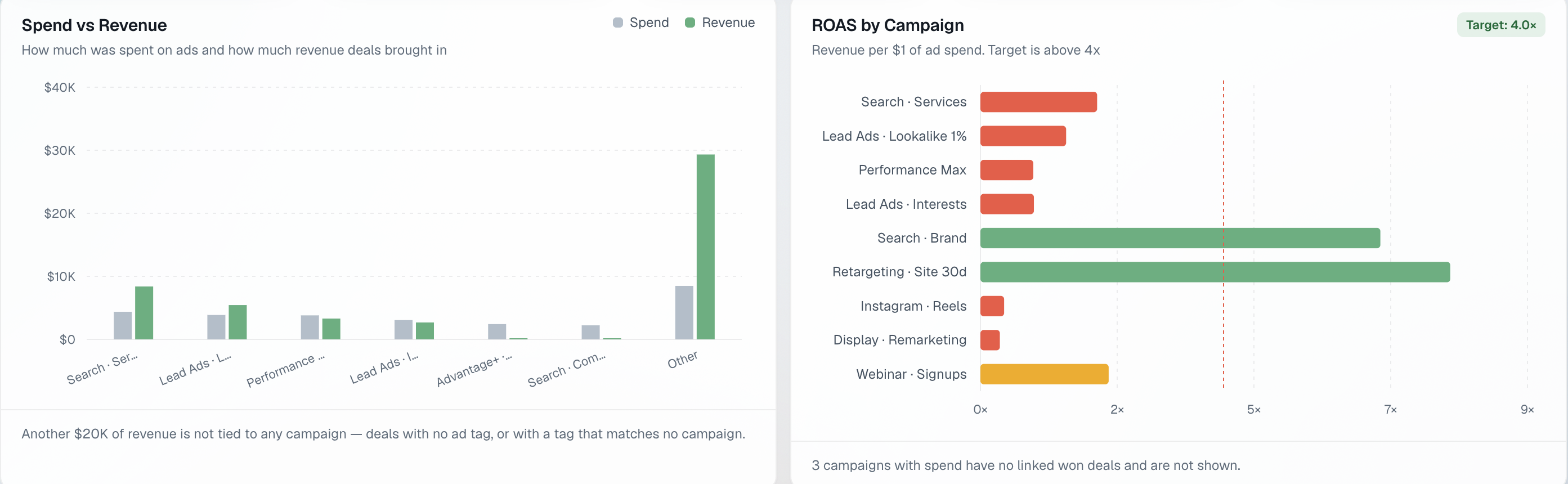
Three checks, all on the Command Center:
- The "Data from" row shows both Bitrix24 and Google Ads.
- The "Deals closed" tile reports a linked count, and the footnote under the campaign table explains the gap per platform (in the demo: Google Ads 37 won deals by CRM source, 34 linked, 3 without an ad ID in the tags).
- The Spend vs Revenue chart has an "Other" bar with its own note. In the demo it is $20K of revenue not tied to any campaign: deals with no ad tag, or with a tag that matches no campaign. That bar is not a bug, it is the honest remainder, and the goal of steps 4 and 5 is to make it smaller.
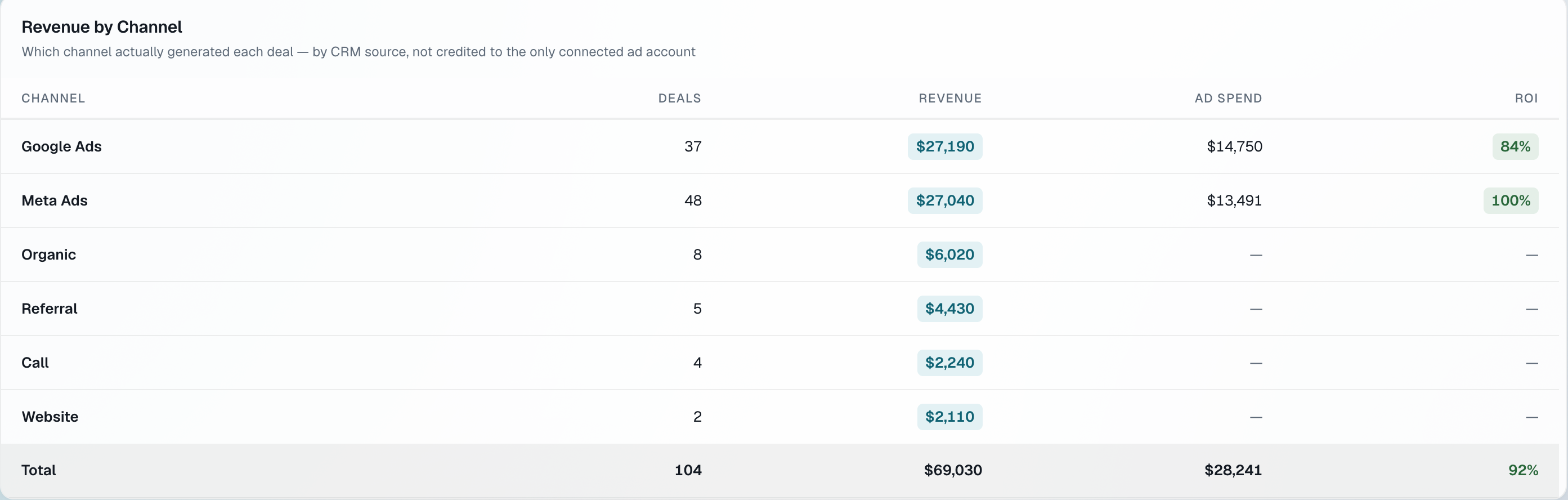
Revenue by Channel is the cross-check: each deal is credited to the channel its CRM source says, not to whichever ad account happens to be connected. If Google Ads shows 37 deals here and 34 linked in the campaign table, the difference is three deals from Google that carried no campaign ID, which is exactly what the footnote said.
Troubleshooting
| What you see | Why | Fix |
|---|---|---|
| Deals closed: 0 | No stage is mapped as won | Settings → Integrations → Stage Mapping, tick the won stage |
| Linked count much lower than deals from ads | UTM fields carry names, not IDs | Add {campaignid} to the Google Ads tracking template (utm_term or utm_content), re-sync |
| Linked count is 0 although IDs are in the tags | The IDs are in utm_campaign only and belong to ad groups | Ad group and ad IDs resolve to a campaign only after the ad sync has seen them; wait for the next sync |
| A campaign shows "No linked" | It has spend but no won deal with its ID in the period | Widen the period, or check the campaign's landing page passes UTM into the form |
| Revenue is zero on won deals | Deals have no amount in Bitrix24 | Fill OPPORTUNITY on the deal, or make it required at the won stage |
| Spend does not match the ad account | A second ad account was not selected | Settings → Integrations → Google Ads, add the account |
What to do next
- Read ROAS vs ROI: which number tells you a campaign pays off for why the ROAS in this table is computed on CRM revenue rather than the platform's conversion value.
- Set the ROAS thresholds for your margin in Settings, so the colour of each row means "profitable for us", not "above an industry default".
- If you run Meta as well, connect it the same way; the campaign table shows both platforms in one list, which is where the budget decision gets made.